WDS answer files : Leaving No Stone "Unattended"
Introduction
Earlier this year, Microsoft’s internal offensive security team disclosed an unauthenticated remote code execution vulnerability affecting Windows Deployment Services (WDS) client computers. WDS is a Windows Server role used to deploy operating systems over the network, typically through PXE boot. It is commonly used in enterprise environments to automate workstation provisioning and large-scale operating system deployments.
CVE-2026-0386
One of WDS’s features allows fully automated deployments using unattend.xml files, also known as "answer files". These XML files contain installation parameters and automation settings for Windows Setup. The vulnerability originated from the way these answer files were transmitted. WDS delivered them through unencrypted RPC communications, making them vulnerable to man-in-the-middle (MitM) attacks. An attacker positioned on the network could intercept and modify the transmitted answer file, potentially achieving remote code execution on the client machine during deployment.
In response, Microsoft released an update in mid-April that disables this "Hands-Free" deployment feature by default.
Exploitability
In practice, I believe this vulnerability is relatively difficult to exploit. However, I think the real value lies elsewhere. Answer files themselves usually contain credentials such as domain join accounts, local administrator passwords, or deployment secrets. Since these files could be retrieved without authentication, the "Hands-Free" functionality could also be abused to recover those secrets.
To explore this further, I implemented the WDS RPC protocols described in MS-WDSC and MS-WDSOSD specifications with impacket. Using these documents and some reverse engineering, I developed a tool called WDSEnum, which can enumerate and retrieve unattend files from WDS servers.
In this article, we will examine how these files are selected, where they are configured, and how they can be extracted remotely.
WDS deployment process
The following section describes the WDS deployment process and behavior prior to the April patch for CVE-2026-0386.
PXE Boot
The WDS deployment process begins with a PXE boot sequence involving several protocols, including DHCP, PXE, and TFTP. Without going too deeply into PXE internals, the process works roughly as follows:
- The PXE client obtains an IP address from DHCP along with the location of the PXE server.
- The client requests a boot image appropriate for its operating system and architecture.
- Depending on the WDS configuration, administrator approval may be required before the image is delivered.
- The boot image is then downloaded over TFTP.
Boot images can contain unattend files and other sensitive data, especially in MDT deployments. If you want more information, read this SpecterOps article.
Boot phase
Once the boot image starts, the client begins communicating with the WDS server through RPC. It binds over TCP/IP on port 5040 using ncacn_ip_tcp:.
An unauthenticated RPC request with opcode 0x05, corresponding to WDS_OP_GET_CLIENT_UNATTEND, is then sent to retrieve an unattend file. This request contains four important variables that are parsed by the WDS server in the function wdsimgsrv.dll:HandlerClientUnattend.
Architecture-specific unattend files
The ARCHITECTURE and FIRMWARE variables are two unsigned integers used together to select architecture-specific unattend files associated with boot images. These mappings are configured directly in the WDS server settings.
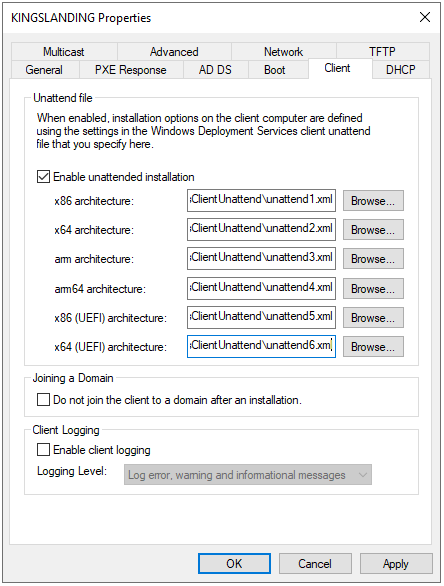
Interestingly, the RPC documentation contains incorrect architecture mappings. After some brute-forcing, I was able to determine the correct combinations required to retrieve unattend files for each supported architecture:
| Architecture | Firmware type | Processor architecture |
|---|---|---|
x86 | PCAT (0x00) | INTEL (0x00) |
x64 | PCAT (0x00) | 0x09 |
arm | PCAT (0x00) | 0x05 |
arm64 | PCAT (0x00) | 0x0C |
x86 (UEFI) | UEFI (0x01) | INTEL (0x00) |
x64 (UEFI) | UEFI (0x01) | AMD64 (0x09) |
This allows an unauthenticated attacker to retrieve all architecture-specific answer files exposed by the WDS server.
Custom unattend files
The CLIENT_MAC and CLIENT_GUID fields are two unicode strings used to retrieve custom unattend files associated with prestaged computers. Prestaged devices are configured manually in the WDS MMC console, either before deployment or during administrator approval. A prestaged computer requires an identifier, which can be either the MAC address, the DHCP UUID or the DHCPv6 DUID.
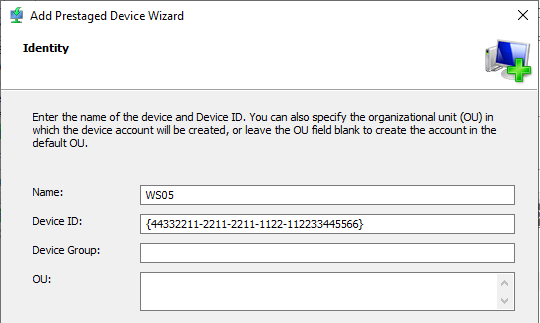
A corresponding domain computer account is then created with the netbootGUID attribute containing the MAC address, DHCP UUID, or DHCPv6 DUID encoded as raw bytes. A WDS administrator can also configure custom settings for prestaged computers, such as the PXE prompt policy, the assigned boot image and the client unattend file. The client unattend file can also be created at this stage and usually points to a relative path inside the WdsClientUnattend folder of the REMINST share, which is the deployment share used by WDS.
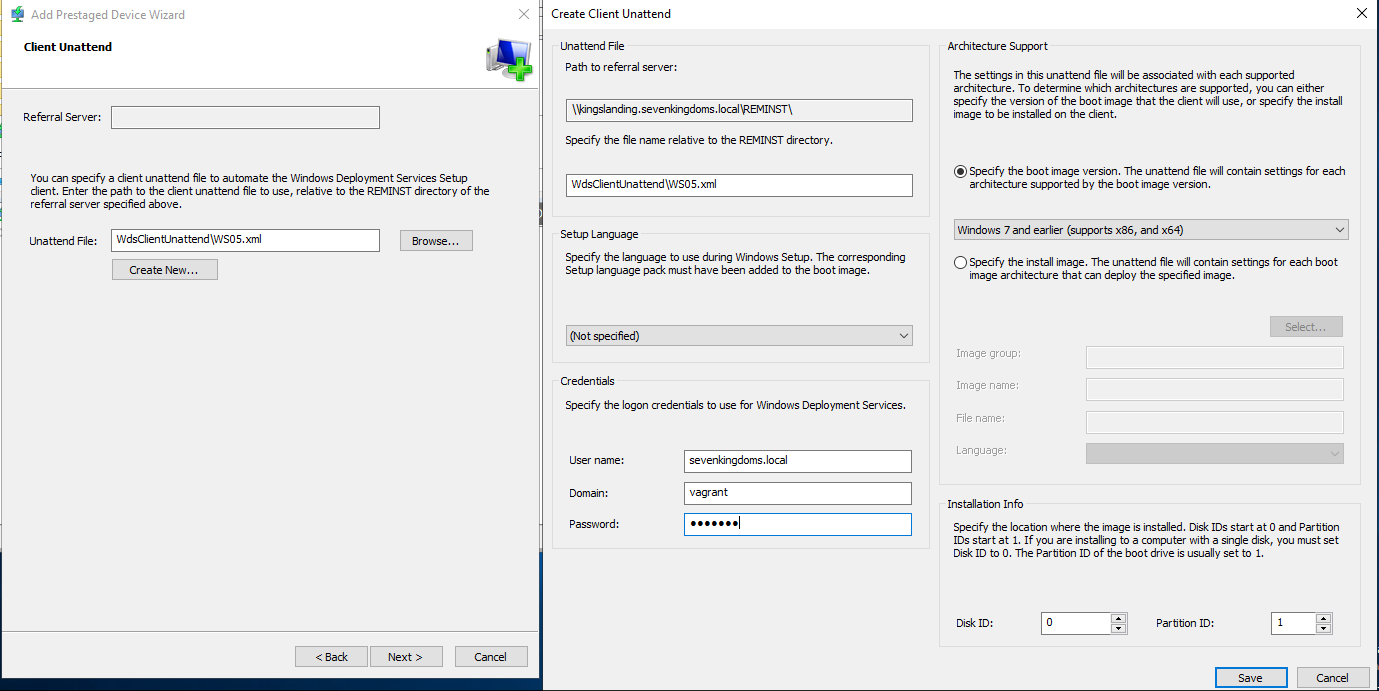
These settings are stored as a semicolon-separated key-value list in the netbootMirrorDataFile LDAP attribute of the prestaged computer. As shown below, the relative path to the unattend file is stored in the WdsUnattendFilePath key.
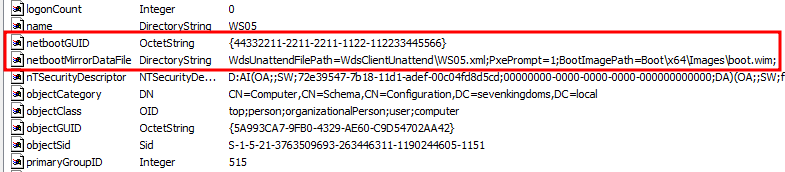
When the client sends the WDS_OP_GET_CLIENT_UNATTEND RPC request, it populates:
CLIENT_MACwith its MAC addressCLIENT_GUIDwith either the DHCP UUID or DHCPv6 DUID
The WDS server then performs the following LDAP query to locate a matching computer object in Active Directory.
(&(objectClass=Computer)(|(netbootGUID=%CLIENT_MAC%)(netbootGUID=%CLIENT_GUID%)))
If a matching object exists, WDS retrieves the WdsUnattendFilePath value from the netbootMirrorDataFile attribute and returns the associated unattend file.
Install Phase
Once the client retrieves credentials, either from the boot phase unattend file or through manual input, the OS install images can be downloaded over SMB. Install images are stored inside the Images/ directories of the REMINST share and can be managed through the WDS MMC console.
Each image can have its own custom unattend file configured by:
- Opening the image properties
- Enabling
Allow image to install in unattended mode - Selecting an unattend file
The unattend file is then copied to Images/. By default, these files are not protected and are readable by any authenticated user with access to the REMINST share.
Post-April patch behavior
After the April patch, the "Hands-Free" functionality is disabled by default. Users are now prompted to manually enter credentials during deployment, even if an unattend file exists in the configuration. While this change effectively mitigates CVE-2026-0386, it still allows attackers to retrieve unattend files over RPC.
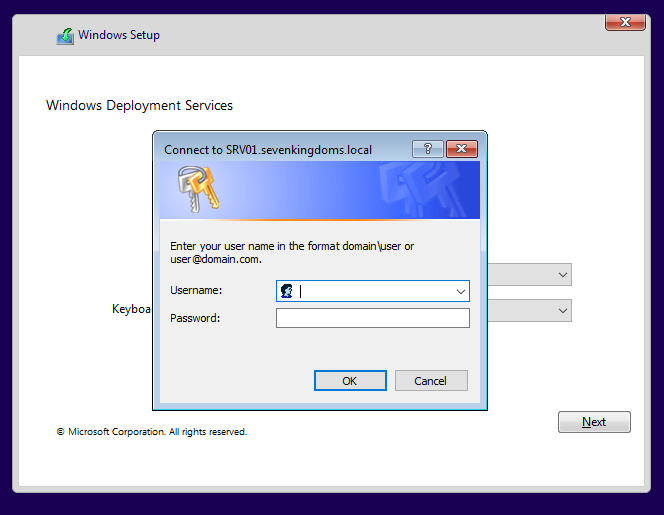
As a result, architecture-specific unattend files can still be retrieved without authentication. This also bypasses PXE response policies, including configurations requiring administrator approval or rejecting unknown PXE clients.
WDSEnum
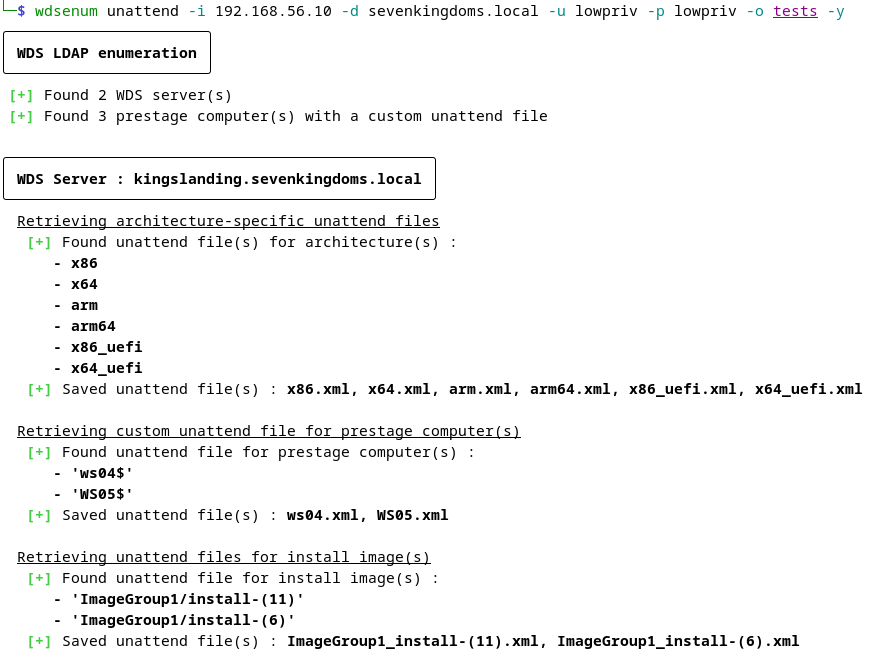
With all of this in mind, I created a tool that can recover unattend files from one or multiple WDS servers.
Unauthenticated mode
Without authentication, WDS servers can be detected by scanning TCP port 5040. WDSEnum can then retrieve all architecture-specific unattend files using the mappings described earlier. It can also retrieve unattend files associated with specific device identifiers, although in most cases an unauthenticated user will not know valid CLIENT_GUID or CLIENT_MAC values.
Authenticated mode
With authentication, WDSEnum first enumerates all WDS servers in the domain as well as the prestaged computers netbootGUID with custom unattend files. Once this is done, WDSEnum:
- Retrieves architecture-specific unattend files
- Uses the recovered
netbootGUIDvalues to retrieve prestaged unattend files - Enumerates the
Imagesdirectory inside theREMINSTshare to recover install image unattend files
Conclusion
WDS deployment is slowly becoming deprecated. The "Hands-Free" deployment functionality is now disabled by default, and deployment of standard Windows boot images through WDS is starting to be deprecated with Windows 11. However, these services are still in use and can contain legacy deployment configurations and credentials that may still be exploitable by attackers.
I hope you found this research interesting. If you have any questions or would like to discuss the RPC protocol internals further that I did not cover here, feel free to reach out on X: @toffyrak